Things to Check in Your Google Ads Account

Whether your Google Ads account is run in-house, by a freelancer or by an agency, it’s worth checking regularly that it’s set up properly and getting the most from your budget. Small issues, like a missing negative keyword or the wrong location setting, can quietly waste hundreds of pounds a month.
This checklist covers the areas we review first whenever we audit an account, followed by how to tell whether your campaigns are actually working.
1. Conversion Tracking
Everything else depends on this, so start here. If your tracking is wrong, Google’s bidding is optimising towards the wrong thing.
- Track actions that matter. Form submissions, phone calls and purchases (with revenue) are conversions. Page scrolls and button clicks are not.
- Set primary and secondary conversions. Only the actions you want Google to bid towards should be primary.
- Use data-driven attribution and a conversion window long enough to reflect how long your customers take to decide.
- Check for duplicates. Conversions counted twice, often from both Google Ads and GA4 tags, inflate your results and mislead Smart Bidding.
- Track phone calls. For many businesses, calls are the most valuable leads. Call tracking tools like WhatConverts show which campaigns and keywords bring them in, and our guide to automating your call details report shows how to keep an eye on them.
2. Keywords and Match Types
Match types decide which searches your keywords can show for:
- Broad match reaches the widest range of related searches. It can work well alongside Smart Bidding and strong conversion data, but without them it can spend heavily on irrelevant searches. It’s also the default setting, so check it before launching anything.
- Phrase match shows your ads for searches that include the meaning of your keyword, with words before or after it. A good balance of reach and control.
- Exact match shows for searches with the same meaning as your keyword. The most control, often with higher conversion rates, and useful for smaller budgets or testing.
When choosing keywords, be specific. A will writer bidding on “wills” will pay more for less relevant traffic than one bidding on “will writing services Nottingham”. Google Keyword Planner is a good free starting point for search volumes and cost estimates.
3. Search Intent
[Keep the original search intent graphic here: image20]
Not every search is worth paying for. Searches tend to fall into four types:
- Informational: “how”, “why”, “what”. Researching, not buying.
- Navigational: looking for a specific brand or page.
- Commercial: “best”, “reviews”, “vs”. Comparing options.
- Transactional: “buy”, “price”, “near me”. Ready to act.
For most accounts, budget should focus on commercial and transactional searches, where people are closest to buying.
4. Negative Keywords
- Review your search terms report at least every fortnight and exclude searches that are never going to convert.
- Use negative keyword lists to block common irrelevant terms (such as jobs, free, training and DIY) across campaigns.
- Include singular and plural versions, and use different match types for your negatives.
5. Non-Performing Keywords
Sort your keywords by impressions and cost, and look for any with no impressions, no conversions or wasted spend over the last 90 to 120 days. Pause or remove them, along with any inactive ad groups and campaigns that are cluttering the account.
6. Ad Copy
- Check the basics. Spelling, capitalisation and special characters. Google won’t always catch mistakes for you.
- Give Google enough to test. Provide a full set of headlines and descriptions, including your brand name, a clear call to action and the problem you solve.
- Match the search and the landing page. Your headlines should reflect what people searched for and what they’ll find when they click.
- Be specific with your call to action. “Get your free quote today” works harder than “Learn more”.
- Use dynamic features carefully, such as location insertion, keyword insertion and countdowns.
- Don’t over-pin. Pinning headlines gives you control but limits Google’s testing and can lower your ad strength.
7. Ad Assets
Ad assets (previously called ad extensions) make your ads bigger and give people more reasons to click.
- Add sitelinks, callouts, structured snippets and price assets, plus your business name and logo at account level.
- Give each sitelink its own landing page, with UTM tags so you can track it.
- Check regularly for disapproved assets and fix them quickly.
Quality score
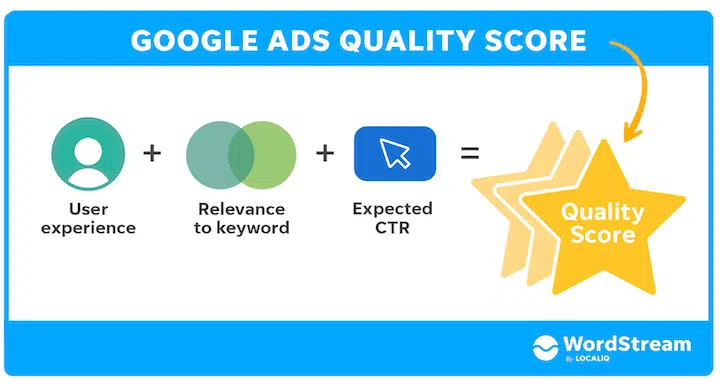
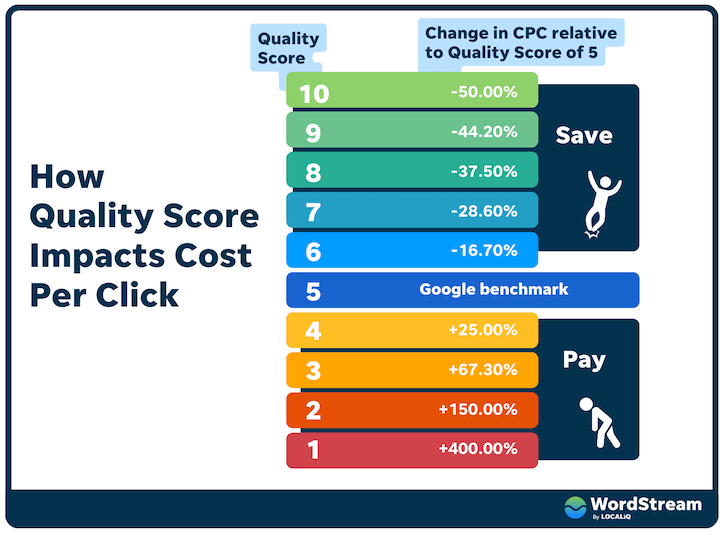
Quality Score is Google’s 1 to 10 rating of your keywords, ads and landing pages. It affects both where your ads appear and how much you pay for each click, so a low score means paying more for worse positions. Anything below 5 needs attention.
Our full guide on how to improve your Google Ads Quality Score covers what affects it and how to fix it.
9. Landing Pages
Your ads can only be as good as the page they send people to.
- Send each ad group to the most relevant page, not your homepage.
- Make sure the page delivers what the ad promised, with the same message and offer.
- Check it loads quickly and works properly on mobile.
- Add reviews, testimonials and a clear call to action.
10. Location Settings
- Target the areas you actually serve, and exclude the ones you don’t.
- Under location options, set targeting to “Presence: people in or regularly in your targeted locations”. Google’s default also includes people who have just shown interest in a location, which can waste budget on searchers who will never buy.
- Consider location-specific ad copy for local offers or events.
11. Placement Exclusions
If you run Display, Video or Performance Max campaigns, exclude placements that rarely reach buyers, such as mobile app games and content made for children.
12. Performance Max
- Check whether Performance Max is running, and whether it should be. Filter by campaign type to see.
- Give it plenty of high-quality images, videos and copy to work with.
- Add audience signals, such as your customer lists, website visitors and relevant interests.
- Check its location settings match the rest of the account.
- Avoid making big changes too often. PMax needs time to learn.
For more detail, see our guide to Performance Max search themes.
13. Campaign Structure
A clear structure makes your budget go further and your data easier to read.
- Split campaigns by what genuinely affects performance: location, product or service, audience or intent.
- Keep brand campaigns separate from non-brand ones.
- Avoid overlapping keywords across campaigns, so you’re not bidding against yourself.
- Don’t spread a small budget across too many campaigns, or none of them will gather enough data to optimise.
- Use consistent naming so anyone can understand the account at a glance.
How to Tell Whether Your Google Ads Are Working
A Google Ads account reports dozens of metrics, but only a handful tell you whether it’s working.
Conversions and cost per conversion
This is the number that matters most. Clicks and traffic only have value if they turn into leads or sales.
Return on ad spend or return on investment
For ecommerce, compare the revenue your ads generate with what you spend. For lead generation, it’s harder but still possible:
- Track your pipeline. For B2B or high-value sales with long sales cycles, track how much pipeline your ads generate over time, not just immediate sales.
- Ask your customers. A simple “where did you first hear about us?” question often reveals that someone recorded as an organic enquiry first saw your ad months earlier.
Click-through rate
CTR shows how relevant your ads are to the people seeing them, but it only matters alongside conversions. A campaign with a high CTR and no conversions is attracting the wrong people. One with a low CTR but high-value conversions may be working perfectly.
Impression share
Impression share shows how often your ads appear compared with how often they could. It’s a useful signal of how Google rates your ads, but more isn’t always better. We’ve seen accounts go from 70% to 90% impression share with no change in leads, and others with 20% that perform very well.
Want a Second Pair of Eyes on Your Account?
Going through this checklist will catch most of the common issues, but it’s easy to miss things in an account you look at every day. Our free Google Ads audit reviews all of the above and gives you a clear, prioritised list of what to fix first.
Jump into another related resource
Whether you’re after expert-written blogs, downloadable guides, or time-saving checklists, our Resource Hub gives you practical tools to make your marketing more effective.